Spread arbitrage · crypto futures

Trade the spread between two assets, not the market direction

DCA Spread Bot is your own pair-trading terminal for futures. Pick two legs, set an entry grid by spread level, a take-profit and a trailing stop — the bot opens and closes both positions for you.

3trading modes
9exchanges
24/7on your own server
RU/ENinterface
dcaspreadbot.com — One-Exchange
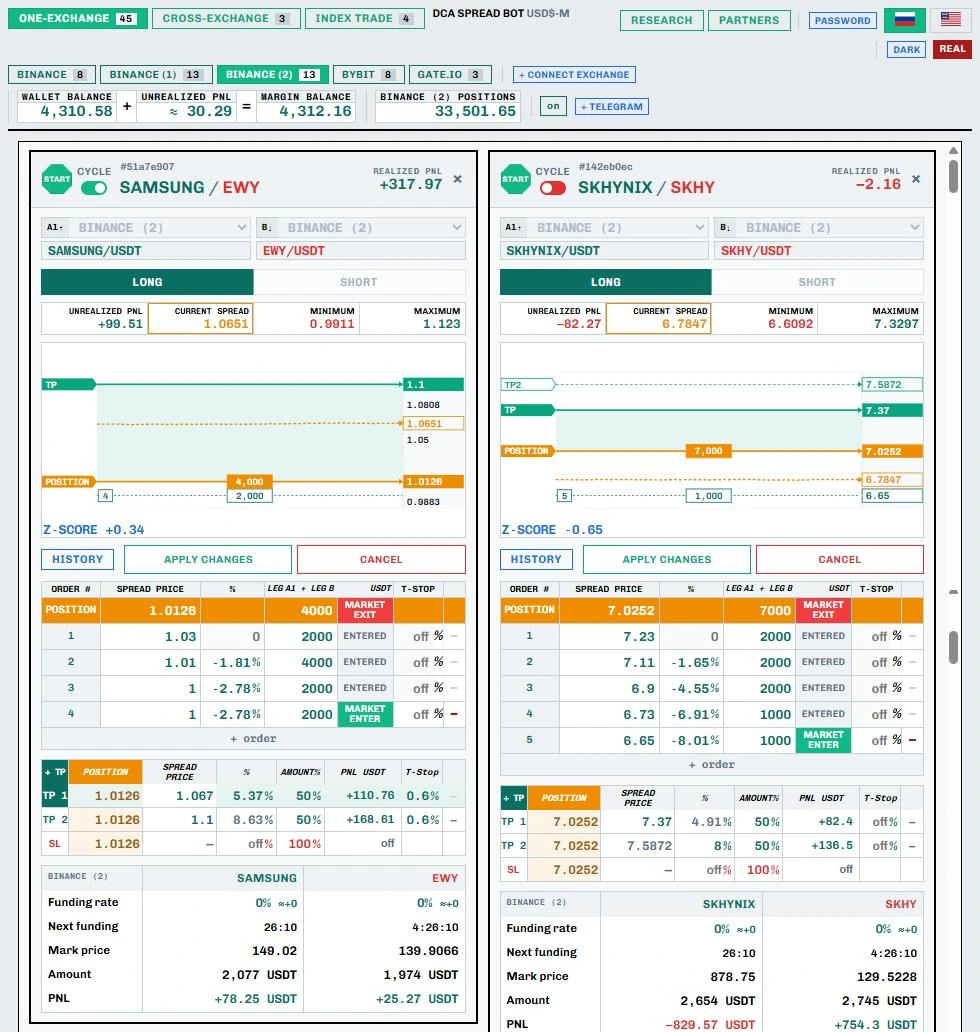
DCA Spread Bot terminal: SAMSUNG/EWY and SKHYNIX/SKHY pair cards in full — spread chart, orders, TP/SL, funding and PnL per leg

What the terminal does

DCA Spread Bot trades the spread in pair (statistical) arbitrage. Here the spread is not the bid/ask gap but the price ratio of two related assets: stocks from one sector, a fund and its largest holding, or cryptocurrencies with a high historical correlation.

01 · Link

The assets move together

For example, Samsung is the largest part of the Korean fund EWY. Their prices usually move in sync, and the SAMSUNG / EWY ratio oscillates around its mean.

02 · Deviation

The link breaks temporarily

One asset becomes overpriced relative to the other — the spread moves away from its mean. The Z-score shows how far.

03 · Reversion

Profit from convergence

The terminal buys the undervalued leg and sells the overvalued one, then closes both when the spread returns to normal (mean reversion).

How to read the screenshot above

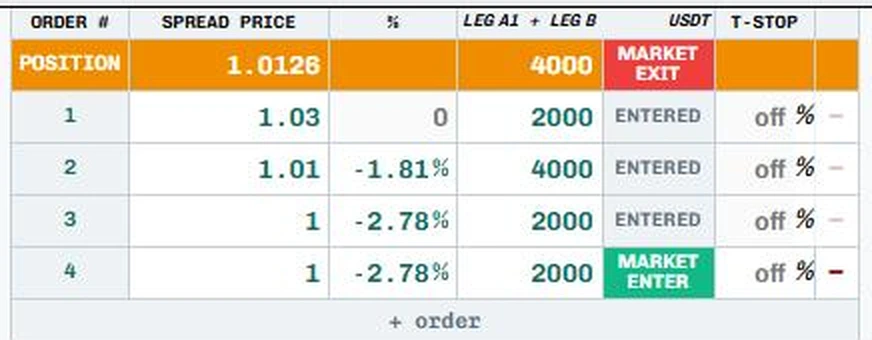
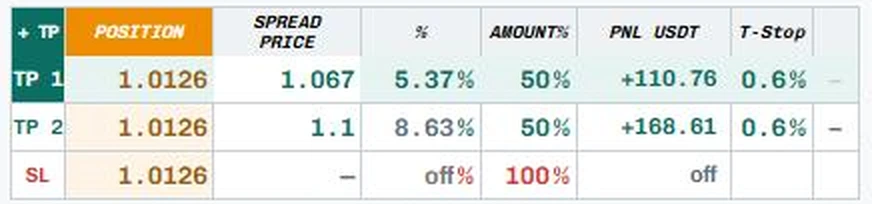
The SAMSUNG / EWY card, direction LONG: the bot bets on the spread rising. A 4-level grid with 3 levels filled (status ENTERED), average entry 1.0126 on 4000 USDT. The exit is split in two: TP 1 at 1.067 and TP 2 at 1.1, 50% of the position each, with a 0.6% trailing stop. The current spread 1.0651 is already close to the first take-profit. At the bottom of the card: funding, mark prices, size and PnL for each leg.

The terminal automates the whole cycle: it finds stretched pairs in Research, enters with a grid of orders by spread level — market orders on both legs at once — averages the position and closes it at take-profit. You set the levels; the bot executes 24/7.

A trade from start to finish

The real terminal interface, One-Exchange mode. The EWY / DRAM pair: entry grid, 10–180-day spread history on the big chart, market entries on both legs at once, averaging in and a take-profit exit. The spread history is real; the trade data is a demo; time is accelerated.

Trade example · 1:38 · with voiceover

Features

Everything you need for pair arbitrage — from finding a pair to an automatic exit.

One-Exchange

A pair on one exchange

Any two futures on the same exchange — long one leg and short the other. Spread, minimum, maximum and Z-score in real time.

Cross-Exchange

Across exchanges and accounts

Legs on different exchanges or sub-accounts: for example, leg A on Binance and leg B on Binance (2) or Gate.io.

Index Trade

A basket against an asset

Add a second leg A2 and trade the ratio of an index or basket to a single instrument.

DCA grid

Multiple entries by spread

Set spread levels and the size of each — the bot averages in if the spread stretches further. Add orders with the “+ order” button.

TP · T-Stop · SL

Automatic exit

Take-profit by spread level, trailing stop in percent, stop-loss and partial closing by size.

Research

Pair scanner

Finds pairs whose price ratio has moved far from normal and used to return to it. Filter by |Z|, history and reversion time.

Funding

Funding under control

Funding rate, time to the next funding, mark prices and PnL for each leg — right on the card.

Cycle

Cyclic trading

Cycle mode re-arms the pair after a take-profit exit — the bot waits for an entry at your levels again.

Telegram

Notifications

Entries, exits and stops are sent to Telegram — no need to keep the terminal open all the time.
How it works

Five steps from setup to your first trade.

STEP 1

Get your own terminal

We deploy the terminal on a dedicated server and give you its address and password. The server runs around the clock — your computer can be switched off.

In the terminal, click + CONNECT EXCHANGE and add your exchange API keys (trading permission only, no withdrawals). Keys are stored on the server and never sent to the browser.

Cross-Exchange
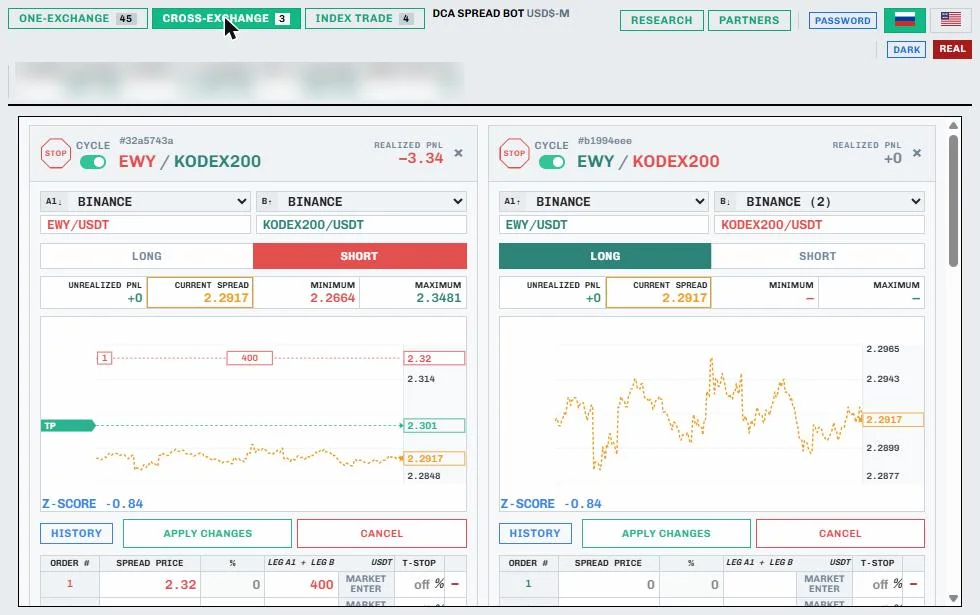
Cross-Exchange mode: EWY/KODEX200 pair on two Binance accounts
STEP 2

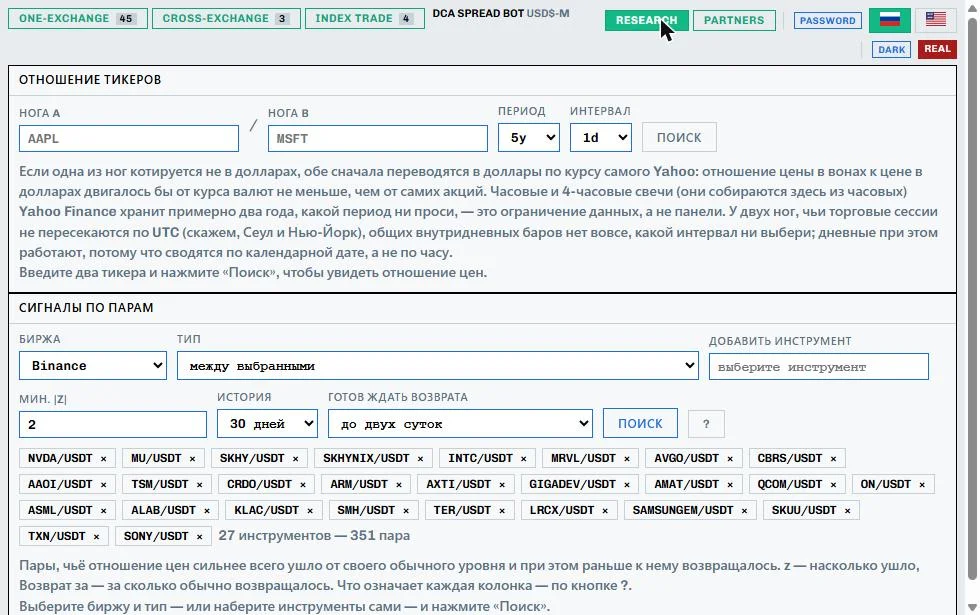
Find a pair in Research

Add instruments, choose an exchange, a minimum |Z| and how long you are ready to wait for reversion — the scanner shows pairs whose spread is stretched more than usual.

For stocks and ETFs there is a ticker-ratio chart based on Yahoo Finance data — handy for checking a pair's history before entering.

Research
Research: ticker ratio and pair signals
STEP 3

Create a pair card

  • Choose the exchange and instrument for leg A and leg B.
  • Direction: LONG or SHORT the spread.
  • The chart shows the current spread, minimum, maximum and Z-score.
  • Entry levels and TP are drawn right on the chart.
One-Exchange
Pair cards with spread chart
STEP 4

Set the entry grid and the exit

In the order table, enter spread levels and the USDT size of each entry — that is the DCA grid. The POSITION row shows the average entry spread and total size; filled levels are marked ENTERED, and pending ones can be opened manually with MARKET ENTER.

Click APPLY CHANGES and START. With CYCLE on, the trade repeats after the exit.

Order table · DCA grid
SAMSUNG/EWY order table: POSITION row and four entry levels with ENTERED and MARKET ENTER statuses
STEP 5

The bot executes and manages the trade

When the spread reaches a level, the bot sends market orders on both legs at once, tracks the position, funding and PnL, and closes it at TP, trailing stop or stop — also with market orders on both legs.

The exit is set in the Take-Profit module: several partial take-profits (for example, TP 1 and TP 2 at 50% each), a trailing stop for each, and a stop-loss. The PNL USDT column shows the profit if each one triggers.

Take-Profit · T-Stop · SL module
Take-profit module: TP 1 at 1.067 and TP 2 at 1.1, 50% each with a 0.6% trailing stop; stop-loss off

Execution: both legs, no imbalance

The main risk in pair trading is ending up with only one leg open. That is why entries and exits are market orders on both legs at once.

01 · Signal

A grid level is a conditional order on the spread. The bot compares the spread with it on every tick.

02 · Market on both legs

Once the spread reaches the level, the bot immediately sends market orders on leg A and leg B at the same time.

03 · Log

The actual fill spread and the bid/ask of both legs are written to the card's log.

04 · Management

The position runs until TP, trailing stop or stop. You can also exit manually with MARKET EXIT.

Pricing

One plan, no hidden fees.

Terminal on a dedicated server

  • Your own server and terminal address
  • All modes: One-Exchange, Cross-Exchange, Index Trade
  • Research pair scanner
  • DCA grid, TP, trailing stop, stop-loss, Cycle
  • Telegram notifications
  • Setup, updates and support
$100 / month

per server

Message us on Telegram

@Artpop2 — we'll reply, show you the terminal live and help you get started.

FAQ

Which exchanges are supported?

Trading: Binance (including multiple accounts), Bybit, Gate.io. Quotes only: OKX, Bitget, MEXC, KuCoin, BingX, HTX.

Do I need to keep my computer on?

No. The terminal runs on a server 24/7; you open it in a browser from your computer or phone.

Are my API keys safe?

Keys are stored only on your server and are never sent to the browser. Create keys without withdrawal permission — then the bot can only trade.

I've never traded spreads. Will I manage?

Yes: when you join, we'll show you the terminal and set up your first pair together. The Research scanner helps you find pairs, and the Z-score shows how far the spread has deviated from normal.

How do I pay?

Message us on Telegram @Artpop2 — we'll explain payment options and how soon your server can be launched.

Leveraged futures trading involves high risk and may result in loss of funds. DCA Spread Bot is a tool for executing your strategy, not investment advice or a guarantee of profit. Past results do not guarantee future results.